
Where the days go in “two-day shipping”
Two orders, two minutes apart, can arrive on different days. Follow the parcels through cutoff, handling, weekends and a holiday before checking the promise in Merchant Center.


At 1:59 on Friday afternoon, a customer orders a parcel with “two-day shipping.” At 2:01, another customer orders the same thing, to the same destination, with the same service.
One should expect it on Tuesday. The other on Wednesday.
Neither should expect it on Sunday.
That is what the phrase means in the example below. The carrier gets two counted days. The customer gives up rather more of the calendar.
Watch the cutoff move the parcel
Imagine a US shop with these deliberately simple settings:
- Order cutoff: 2 p.m. Eastern time, using the America/New_York time zone.
- Handling: 0–0 days; eligible orders leave the warehouse the same day.
- Handling days: Monday through Friday.
- Transit: 2–2 days for this destination, counted Monday through Friday.
These are invented settings, not a claim about any particular carrier or shop. Both orders are in stock, need no special preparation, and use the same shipping option. The dates are calculated estimates, not guarantees.
Google treats handling day zero as the eligible starting day. Before cutoff, that can be today. After cutoff, it becomes the next handling business day. Transit follows dispatch; its count includes the delivery day. This is the convention behind Google's estimated-delivery example.
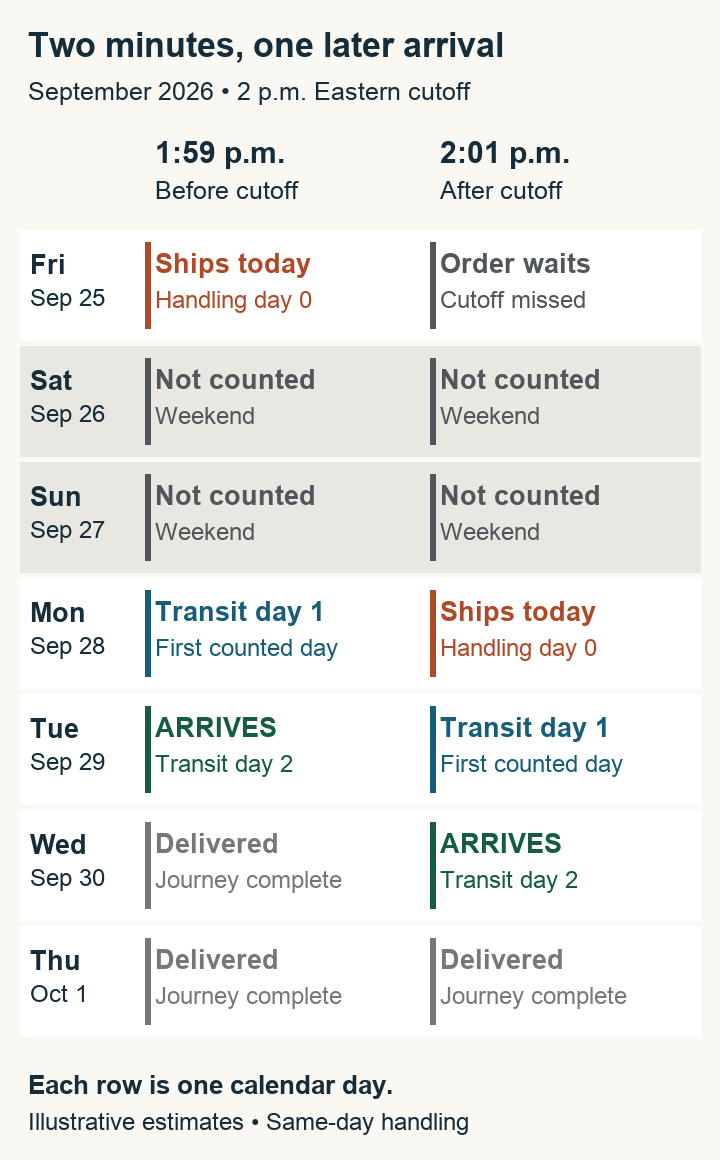
Same settings, same Friday, two different arrival dates. Gray dates remain part of the customer's wait even though they do not advance the count.
The calendar in words: On Friday, September 25, 2026, the 1:59 p.m. order ships; the 2:01 p.m. order waits. Saturday the 26th and Sunday the 27th count for neither order. Monday the 28th is transit day one for the first parcel and dispatch day—handling day zero—for the second. Tuesday the 29th is transit day two and arrival for the first; transit day one for the second. The second arrives Wednesday the 30th, on transit day two. Both journeys are complete by Thursday, October 1.
Notice where the second order loses ground. Its two transit days have not become three. It has missed the opportunity to leave on Friday.
“Same-day handling” is easy to misread here. Zero is a handling duration measured from the eligible starting day. It does not mean every order leaves on the date a customer presses Buy.
Now take Monday away
Put those same two orders on Friday, September 4. Keep every setting the same, but let the warehouse and service observe Labor Day on Monday, September 7, 2026. That is the 2026 holiday date; Labor Day is also on Google's US list of excluded holidays.
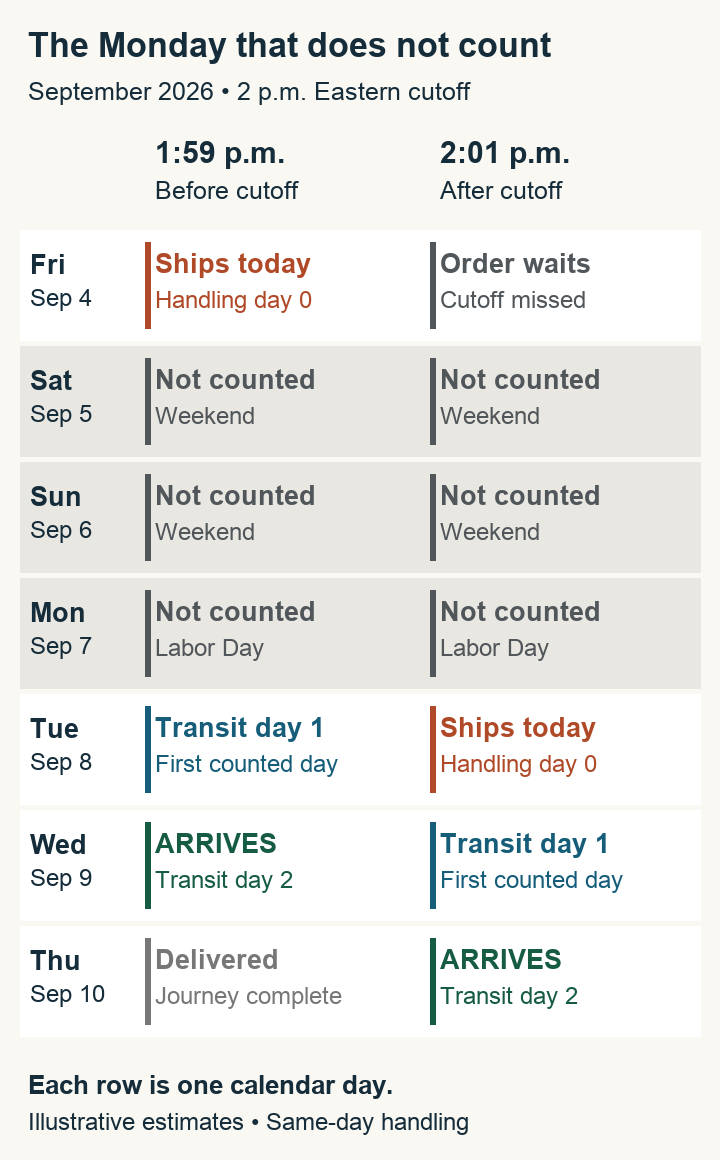
The calendar keeps moving through the three gray rows. The delivery calculation does not.
The calendar in words: Friday, September 4, the 1:59 p.m. order ships and the 2:01 p.m. order waits. Saturday the 5th, Sunday the 6th and Labor Day, Monday the 7th, are excluded for both. Tuesday the 8th is transit day one for the first parcel and dispatch day for the second. Wednesday the 9th is arrival on transit day two for the first and transit day one for the second. The second arrives Thursday the 10th, on transit day two.
Friday to Thursday. Still two transit days.
A holiday changes a particular journey only where it intersects the relevant schedule. Do not add a generic “holiday buffer” to every order. Trace the dates, with the warehouse's operating calendar and the actual service's calendar beside you. Google's holiday treatment does not establish when your own warehouse closes.
What if packing takes a day?
The zero in our example did real work. It meant the parcel could leave on its eligible starting day.
If this shop needs one handling day, the ordinary Friday order placed before cutoff starts handling on Friday, day zero, and ships Monday, day one. Tuesday and Wednesday become its two transit days. The after-cutoff order starts handling Monday, ships Tuesday, and arrives Thursday.
The carrier has not slowed down. Preparation moved the handoff.
Google's handling-time guidance distinguishes same-day dispatch, entered as zero, from dispatch the next business day or later, entered as one or more. Check the time until the carrier actually receives the parcel, not merely the time until someone prints its label.
The reverse question matters too. If the service genuinely counts Saturday, that can bring arrival forward. The warehouse and carrier need not share a working week. Google's transit-business-days attribute represents the carrier's delivery days. Confirm those days explicitly for the service and destination; “business days” alone leaves the calendar unfinished.
Put one real promise through the calendar
Choose a product and destination you actually sell to. Write down the arrival date a shopper is being invited to expect, then work back to the handoff that would make it possible.
In Merchant Center, start with Shipping and returns → Shipping policies and the policy applicable to that product and destination. For a manually entered speed, inspect the cutoff and its time zone, the handling range and working days, and the transit range and working days. If a range is supplied, Google's “arrives by” calculation uses its maximum handling and transit values. A 0–1 handling range therefore does not promise dispatch today. Google's account shipping setup describes these controls.
Check the product data as well. Product-level handling values can replace the account values for that item. A product's shipping override can also change which settings apply, and a store integration can overwrite manual changes. Inspect the effective configuration before correcting a number in the account screen. Handling precedence · Shipping overrides and integrations
If Google calculates speed by carrier, verify the ship-from location, carrier service, cutoff and handling inputs instead of assuming a fixed two-day transit value. Google's calculation uses the warehouse and customer locations with the carrier details. Carrier-calculated delivery times
Then run three paper orders: just before cutoff, just after it, and before an upcoming closure. For each, record:
- The timestamp and time zone of the order.
- Its eligible handling day zero and dispatch date.
- Every counted transit day, including arrival.
- Every skipped date and the reason it was skipped.
Compare the resulting dates with the product page, shipping explanation and checkout for that same destination and option. If the site only says “two-day shipping,” a customer cannot do this comparison. The missing information has become their assumption.
For our ordinary Friday example, useful copy could say: “Order before 2 p.m. Eastern: estimated arrival Tuesday, September 29.” After cutoff, it must change to Wednesday. A supporting explanation can say that dispatch is on working days and transit takes two business days. Only use those words and dates when the operation supports them.
This is a useful conversation to have with fulfillment before buying more traffic for a fast-shipping promise. Ask what happens to the parcel ordered at 2:01. If the answer is “it waits until Monday,” put Monday on the calendar. The customer already will.