
One product, two sale prices: trace a Shopping mismatch to checkout
One invented jacket changes sale price at 10:00. Its page, structured data, feed, Shopping listing and checkout do not agree. Follow the first split and its owner.


At 10:20, a moss-green jacket is $89 in Shopping. At 10:21, the same jacket is $99 at checkout. It is tempting to open the feed and change a number. That might even make the listing look right. It would miss the most revealing split.
This is an invented merchant and an invented sale, with deliberately fixed times. We are following one variant—the Northline shell, moss, medium—on September 24, 2026, in Mountain time. Its regular price stays $129. At 10:00, the merchant changes its sale price from $89 to $99.
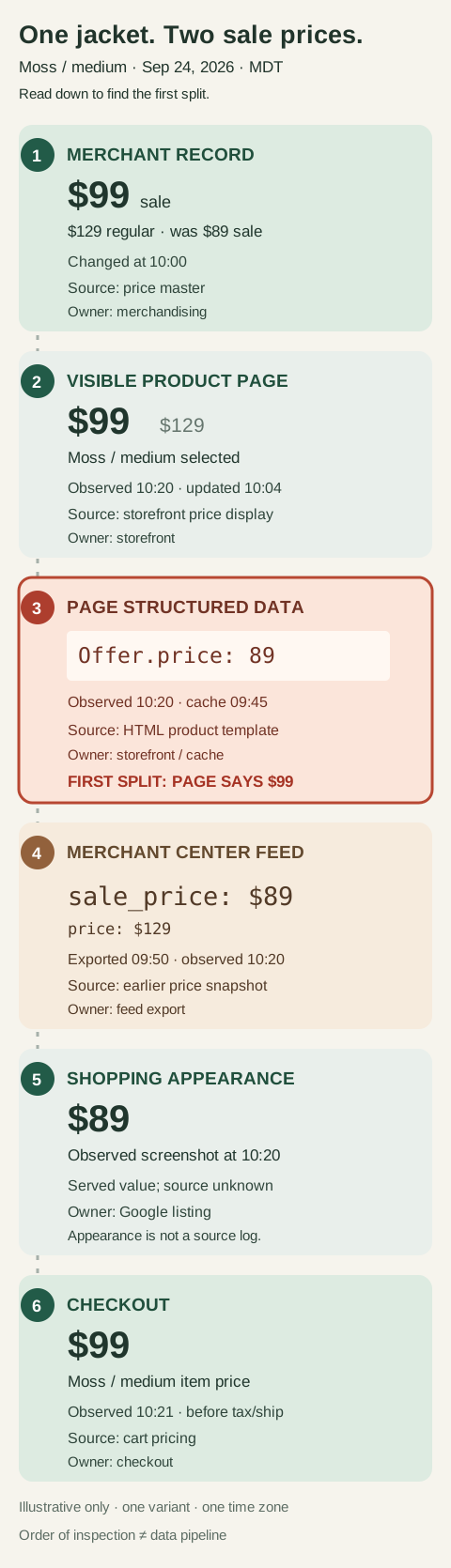
The six places to inspect. The numbers mark an inspection order, not a claim that each system copies the one above it. All prices and times are illustrative.
The third card is the useful surprise. The visible page has already caught up: $99, with $129 crossed out. The page's structured data—its machine-readable current sale offer in HTML—still reads Offer.price: 89. In this fictional store, a cached product template last built at 09:45 supplies that value. The first disagreement in this inspection order lives inside the page, between what the shopper sees and what the page tells a crawler. The feed will get blamed first; it has a row you can point at. Changing only that row cannot make the page agree with itself.
There is a second stale copy. The feed row for moss / medium was exported at 09:50, before the sale change. Here, the feed's price is the $129 regular reference; sale_price should carry the current sale price but still says $89, like the page's Offer.price. Google's sale-price rules call for the submitted sale price to match the landing page and checkout, with the regular price submitted separately.
Shopping's $89 appearance is an observation, not a forensic receipt. You cannot tell from that screenshot alone whether Google served the submitted feed value, read stale page data, or has yet to process a newer value. Google says it compares submitted data with landing-page content and can use structured data and other page signals for automatic updates. Its price-mismatch guidance also names delayed page updates, stale markup, and prices that change after page load among the causes to investigate. The screenshot tells you what the shopper was promised. The timestamps and sources tell you where to look next.
The checkout quote finishes the trace: $99 for moss / medium, before shipping or tax. The shopper saw the $10 jump on the landing page; checkout confirms it. The policy problem may appear as a mismatch or disapproval; the immediate problem is simpler. The listing offered a price neither the page nor the cart will honor. Google requires the sale price to remain consistent through checkout, but a correct checkout price does not erase the incorrect Shopping invitation.
Repair the first split, then the other copy
Start with the exact item ID and a URL that actually opens moss / medium. If the URL silently selects black / large, a different price may belong to a different variant; you have found an identification problem, not proved this sale price wrong. Keep the currency and the active sale window beside the ID. A sale that starts in one time zone and ends in another can make two otherwise sound systems disagree.
For this jacket, the storefront owner refreshes the cached structured data so its offer says $99 for moss / medium, matching the visible page. The feed owner updates the export from the merchant price record and checks that the next processed row has price: 129 USD and sale_price: 99 USD. The checkout owner confirms the same variant still quotes $99 as the item price. Those are three confirmations from three places, not three copies of a corrected screenshot.
Between the page repair and the new feed export, imagine that Google notices the corrected page and Shopping begins showing $99. That is a possible automatic correction, not a repair receipt: the submitted feed can still say $89. Google says automatic updates are for sporadic discrepancies, not a replacement for regular product-data updates. A later submission of the old feed can revert an automatic update; Google also warns that frequent mismatches may result in disapproval rather than an update. After the corrected submission, check Merchant Center's processed value and diagnostics, then observe the listing again. Allow for processing and crawl delay rather than treating an immediate screenshot as final.
The habit worth keeping is to ask, at each price: which exact variant, which value, whose copy, and as of when? Once those four answers are visible, “the feed is wrong” stops being a diagnosis and becomes one testable part of the repair.