
Before you post in Google Ads Editor—and after
Follow one change set from a fresh download through review, posting and repair. Catch wrong selections, stale baselines and the move that only half happened.


A Google Ads Editor post can be technically valid and still change the wrong campaign. It can also finish with an error after changing part of the account. Neither a green icon nor a failed-post message answers the question that matters: does the account now contain the change you meant to make?
Use this companion beside a substantial edit. The method follows the same objects through three states: the account you downloaded, the proposal you reviewed, and the account after posting. Keeping those states separate makes the difficult cases easier to see.
The worked example below is synthetic. The account, names, values and posting outcome are invented; the Editor behavior is grounded in Google's linked documentation, not a live product test.
Give the change a recognizable shape
Suppose you're updating Alder Outdoor — US, customer ID 000-111-2222. Two existing Search campaigns are involved: Search — General and Search — Hiking. Hiking uses its own daily budget, not a shared budget.
The instruction is to move the exact-match keyword [waterproof hiking boots] from General / Boots into Hiking / Waterproof, raise Hiking's daily budget from $180 to $220, and pause [winter hiking boots] in Hiking / Seasonal. The other work already sitting in Editor is not part of this post.
Before touching rows, write what the completed account must contain:
| Object | Downloaded baseline | Intended result |
|---|---|---|
| General / Boots / [waterproof hiking boots] | Enabled | Removed from this ad group |
| Hiking / Waterproof / [waterproof hiking boots] | Absent | Added, enabled, exact match |
| Hiking campaign budget | $180/day | $220/day |
| Hiking / Seasonal / [winter hiking boots] | Enabled | Paused |
That is three business instructions but four entity-level changes. Our comparison follows four rows; it does not predict the precise count every Editor summary will display.
Record the customer ID, campaign and ad-group identities, keyword text and match type. Include entity IDs where available, particularly when names repeat or will change. For an ad edit, retain its ID and the full affected text or URL. “The boots keywords” is too loose to reconcile afterward.
The move deserves two rows because success has two ends. Finding the keyword in Hiking does not tell you whether you also left it in General.
Establish what “before” means
An old local download is a record of what Editor knew then. It is not a fresh account baseline.
Save existing local work before refreshing. An AEA archive contains unposted changes as well as comments and draft campaigns, so name the file accordingly: a backup taken after editing is a backup of the edited local state. If you need a clean pre-edit comparison, capture it before making the new edits. Google: AEA backups
Use Get recent changes for the affected account. Include the campaigns carrying local work you need to retain: Google warns that excluding a campaign with unposted changes can lose those edits, with a chance to cancel the download. In the downloaded-change review, inspect Account updates with unposted changes only. This exposes overlap; overlap is not automatically a conflict on the same field. Google: reviewing recent changes
Now imagine the first useful interruption. Your local proposal says $220. The refresh reveals that someone else reduced Hiking to $150 while you were working.
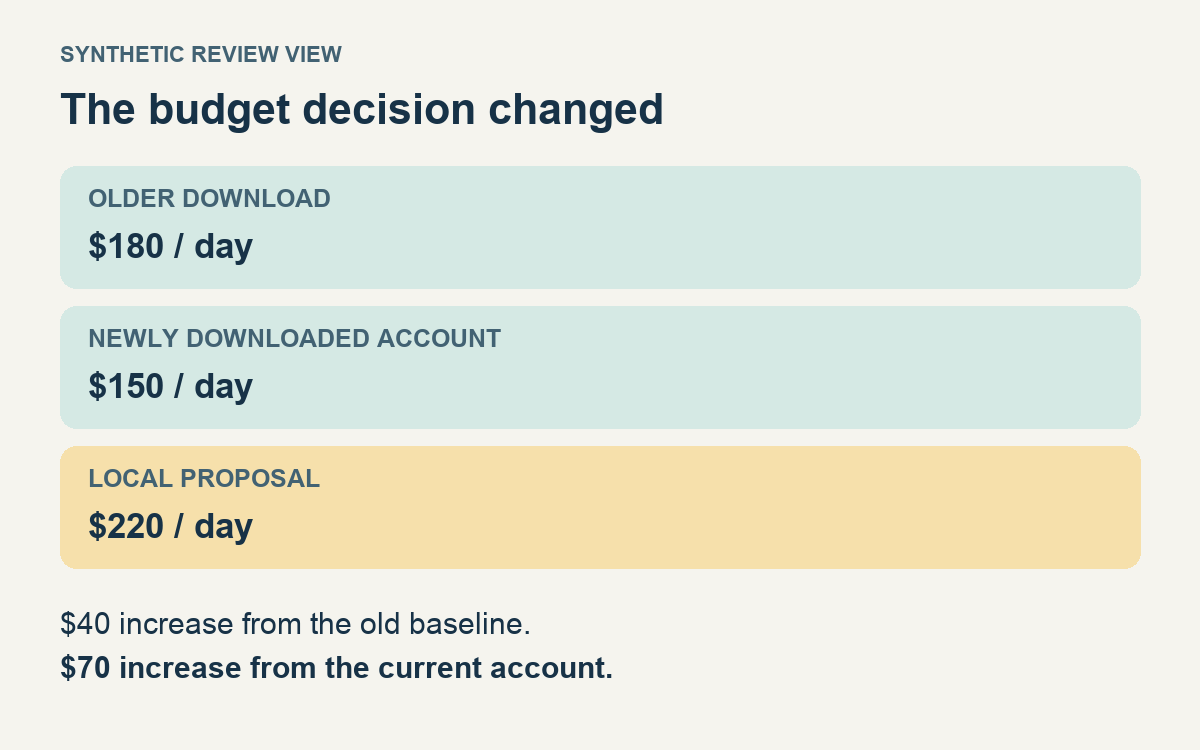
Same proposed value. Different decision.
From the old baseline, your proposal was a $40 increase. From the fresh account, it is a $70 increase and overwrites the intervening reduction. Find out why $150 was chosen before keeping $220. Perhaps someone corrected an overspend problem; perhaps your larger budget is still the agreed plan. The conflict marker cannot make that decision.
Be particularly careful with inaction here. Google's documented conflict behavior is that Revert uses the downloaded version; doing nothing keeps the unposted version for the next post. Closing the review is not a way to defer the decision. Google: resolving conflicts
For the rest of this example, assume the team confirms $220 against the new $150 baseline. Update the review record to $150 → $220. If the decision had been to keep $150, remove the budget edit from this release instead. The earlier approval of $180 → $220 would no longer describe either outcome.
Review from the account outward
Start at the account name in the tree. Choose View filters → All unposted changes, then work through the types containing edits. This is Google's recommended starting point for the pre-post review. Google: review unposted changes
Beginning here catches the awkward selection error: you edited the right-looking keyword in Search — Canada, or included an unrelated campaign setting while selecting rows. Clear restrictive searches and inspect tree and type filters before deciding the view is complete. Editor's data view changes with both the tree selection and the selected type. Google: navigation, filters
Then narrow to the intended campaign pair. Put the fields that identify the objects beside the fields being changed. Read the removal as carefully as the addition. Check the whole proposed result for each instruction:
- Move: the exact source is being removed and the exact destination is receiving the keyword. Verify match type, status, applicable bid and keyword URL rather than recognizing only the text. Inspect the destination's ads, negatives and campaign settings where they could defeat the reason for moving it.
- Budget: the change is on Hiking, from the newly agreed $150 baseline to $220, with the intended budget relationship.
- Pause: the winter keyword is paused in Seasonal. The ad group and campaign are not being paused along with it.
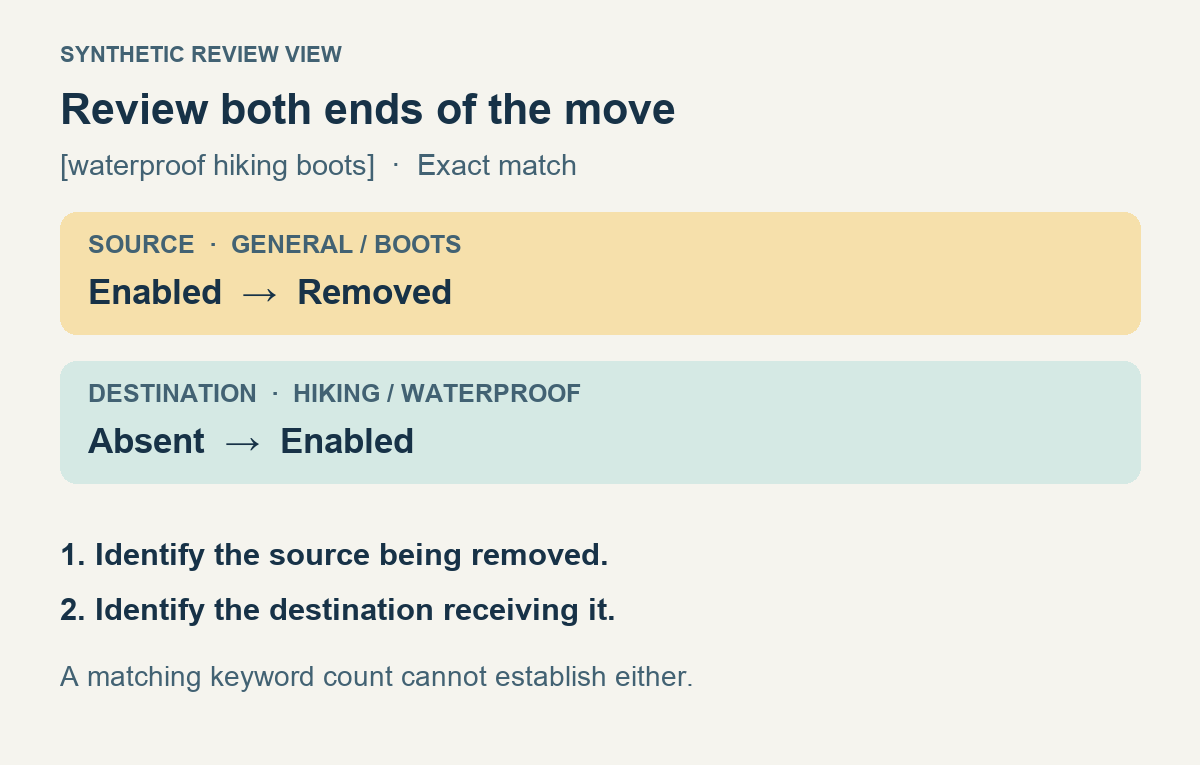
One instruction, two places to inspect. The figure is a review illustration, not an Editor screenshot.
Google documents moving keywords by cutting them and pasting into another ad group. It also explicitly notes that keyword performance statistics do not transfer to the new location. Preserve the old location's history when you need it for comparison; do not describe the new row as though its past clicks moved with it. Google: copy or move keywords
With hundreds of moves, make this comparison in an export as well: each expected source should have the intended destination, match type and resulting status. Reconcile the full list. A few sensible examples cannot reveal the single row sent to a similarly named ad group. Read all exceptions, removals and changes to settings that affect many items; use counts to find discrepancies, then use identities to explain them.
For ad edits, add one more check: does the online ad contain fields that Editor does not support? Google warns that posting an edit can strip text from unsupported fields and recommends making those edits in the online Ads interface. A review limited to the fields Editor displays cannot protect text it does not show. Google: posting limitations
Save something a reviewer can actually review
Keep a readable record of the proposed changes alongside the recovery material. They serve different purposes.
| File | Useful for | Limit to remember |
|---|---|---|
| CSV export | Comparing rows and values outside Editor | Its scope may be only the current filtered view; inspect what was exported. |
| AES share file | Importing proposed changes into another reviewer's Editor | Time-sensitive; not a permanent record that will reliably apply later. |
| AEA archive | Preserving the archived local account or selection | Includes local unposted work; an old archive can conflict with later account changes. |
Google supports exporting the account, selected campaigns or ad groups, or the current view to CSV. Enable Include original columns in CSV/ZIP exports when useful: the generated #Original columns contain identifying values last synced from the account. Inspect the actual columns; do not assume every changed field now has a complete before-and-after pair. Keep a separate baseline export for values the review requires. Google: CSV exports, CSV identity and original columns
For an AES handoff, sender and reviewer should download recent changes at roughly the same time. AES files depend on the account state around their creation. They also exclude draft campaigns; don't change a campaign to Enabled merely to make it appear in a review file unless that status change itself is intended. Google: share proposed changes
Put a short note beside the files: customer ID, download time, included campaigns, four expected rows in this example, the refreshed budget decision, reviewer and intended posting scope. Freeze that reviewed version. If you edit again, identify and review the difference rather than letting an old approval follow a changed file.
Let Check changes answer its own question
Run Check changes and confirm the account selection and count being checked. Investigate errors and warnings. Red errors prevent the affected item from posting unless resolved or an applicable exception is requested; yellow warnings do not necessarily block a post. Green indicates that an item passed the policy checks described by Google, which also says Editor does not flag every editorial violation. Google: Check changes, errors and warnings
These checks help establish whether the proposed items can post. They do not know that your winter pause belongs in Seasonal, or that the $150 reduction was deliberate. Keep those questions in the human review.
At Post, inspect the choice between All campaigns and Selected campaigns and the summary before continuing. A search that made your review easier is not the posting selection. In our case, the release needs both General and Hiking. Posting only Hiking would omit the source side of the move. Selecting both campaigns also requires accounting for any unrelated pending changes inside them. Do not assume selected keyword rows define the release. Google: posting changes
On a shared account, keep the interval between refresh, final review and posting short, and coordinate who is editing the affected objects. This reduces collisions; it is not an account lock. If new information changes the baseline, reopen the relevant decision.
A partly posted move is a new account state
Copy the posting report into your review record before dismissing it. Editor reports successful changes and errors, and keeps campaigns or ad groups with unsuccessful changes in bold. Those are useful leads, not the final reconciliation. Google: post results
Suppose the saved report and subsequent account inspection establish this synthetic outcome:
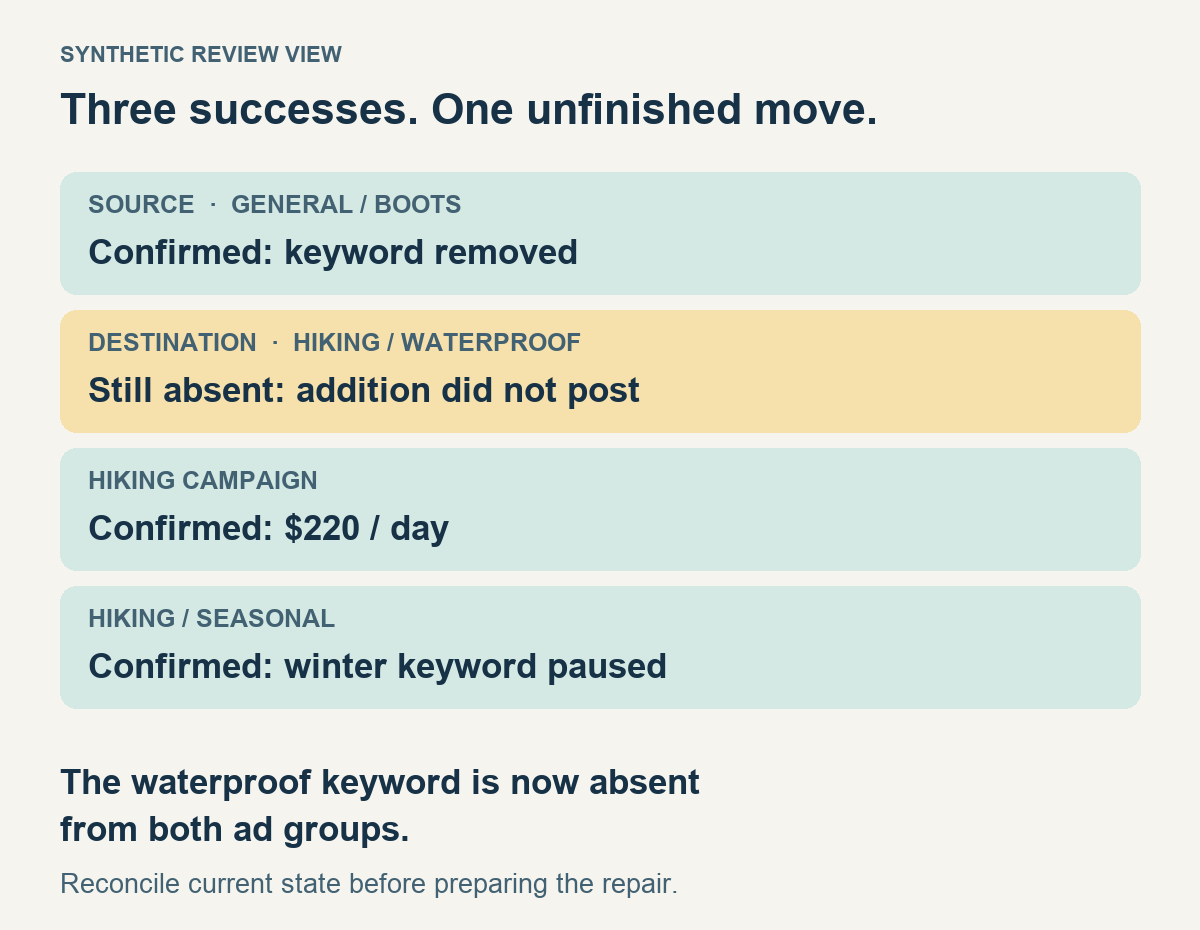
The account now has the $220 budget and the paused winter keyword, but [waterproof hiking boots] is absent from both ad groups. “One row failed” understates the business result. The intended destination has not received the keyword.
Do not immediately resend the original batch. Preserve the report and remaining local work, refresh carefully, and compare each expected result against the online account. Name the four outcomes separately: source removed; destination absent; budget $220; winter keyword paused. Where the report and account disagree, retain the discrepancy until you can establish the current state.
Use online Change history, filtered to the posting interval and relevant objects, to help identify what changed, who changed it and which tool was involved. It includes Editor changes and lets you inspect details. This is especially useful when another operator or automation may have changed a value after your post. Pair history with current field values; they answer different questions. Google: account change history
Repair from that reconciled state. In this example, investigate why the destination addition failed, then review the corrected addition and its destination conditions. Confirm whether the original move still makes sense before posting the repair. If the source remained enabled instead, the unfinished result would be different: the removal would still need a decision. Don't infer one side from the other.
There is a particularly consequential retry prompt to recognize. When an edit targets an item removed online, Google says Editor can post other valid changes and offer to download recent changes. Remaining edits can then become additions. Choose the route that allows review before posting again; recreating an intentionally removed item is a new decision. Google: “Get recent changes recommended”
Close the change, not just the dialog
After posting or repair, confirm the intended values in the online account and retain the observation time. Refresh Editor too, taking care of remaining local work. For approval information, Google's documented download route is Get recent changes → More data. A posted entity and an entity ready to serve are separate facts. Google: download approval information
If the right response is restoration, the archive helps you construct it. It does not make restoration indiscriminate. Google's own backup example tells you to review imported changes and reject those that would overwrite intervening updates. Google: restoring an earlier campaign version
A backup cannot rewind spend already incurred or impressions missed while the account was wrong. Keep those consequences separate from whether you have restored the desired settings. Likewise, Change history's Undo is conditional, not universal; inspect exactly what it will reverse before using it. Google: undo limitations
For the next large change, keep this compact record beside Editor:
| Before posting | After posting |
|---|---|
| Correct customer ID and complete campaign scope | Saved posting report, including errors |
| Fresh baseline, with existing local work preserved | Current values checked against every intended result |
| Each instruction expressed as identifiable before/after rows | Both sides of every move accounted for |
| Conflicts resolved against the latest account state | Remaining work named, owned and reviewed before retry |
| Reviewed files match the selected posting scope | Completion recorded separately from approval and serving |
You should be able to finish with a sentence more useful than “posted”: the keyword is enabled in Hiking / Waterproof and removed from General / Boots; Hiking is at $220; the winter keyword is paused; nothing from this change remains unconfirmed.
If you cannot yet write that sentence truthfully, write the unfinished part instead. That is the work still in front of you.