
One Google Ads Click, Two URL Journeys
Follow the visitor and the background tracker separately to find a wrong destination, a missing parameter or a broken tracking route.

Someone sends you a URL and says, “This is where the ad goes.”
Before opening it, find out where they copied it. The address printed in a Search ad, the saved final URL and a link assembled for a tracking provider can all belong to the same click. They describe different parts of its journey.
With parallel tracking, the visitor can reach the website while the click tracker takes a separate route in the background. Opening the tracker in your own tab puts your browser on that second route. A successful page load there does not prove which page the paid visitor saw. Google requires parallel tracking for Search campaigns. How parallel tracking works.
Here is one illustrative click. It uses a Search ad with a fixed destination and a third-party tracker. The domains, paths and parameter values are invented; this is a map of the mechanism, not a recording from an account. Dynamic destination selection, sitelinks and separate mobile URLs need their own starting URL.
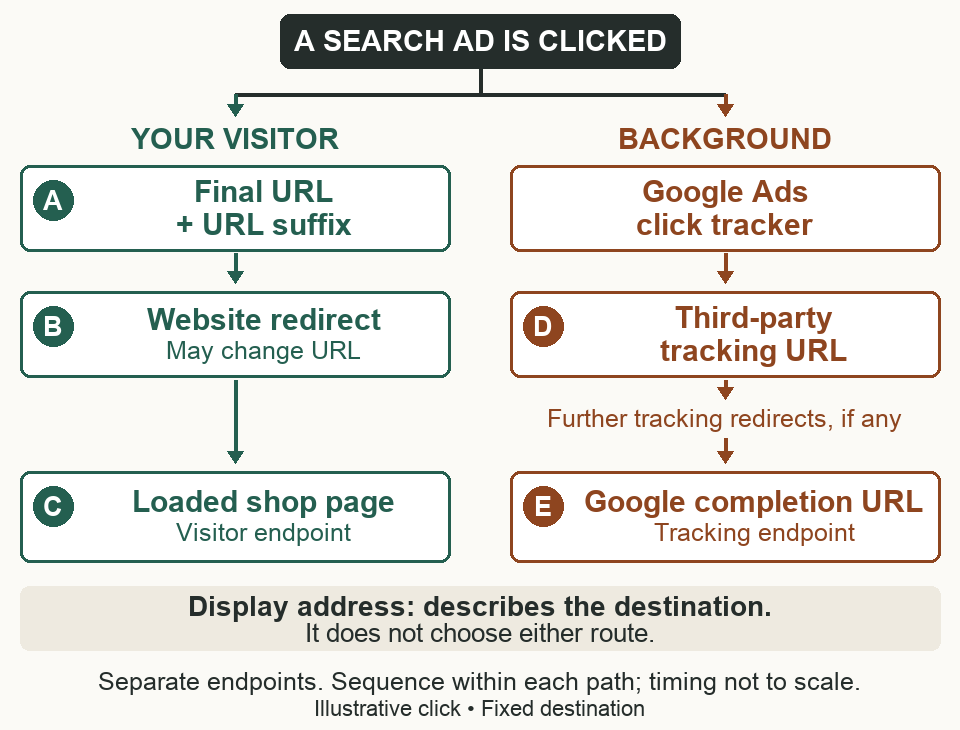
Read down each path. Their positions show sequence within a path, not matching timings across paths.
Before the click: the address in the ad
The ad might show:
shop.example / boots / waterproof
Its saved final URL is:
https://shop.example/rain-boots
The display paths describe the destination; they do not choose it. Typing shop.example/boots/waterproof into a browser tests a path that the ad may never request. Google permits display-path text to differ from the final URL’s actual path. About Search ad paths.
For this example, the final URL is the starting destination. In a real account, establish the clicked ad or asset and the applicable destination settings first. An ad editor screenshot alone is not a trace of a particular click.
A → B → C: follow the visitor
A. Google assembles the landing request. Our final URL suffix is:
utm_source=google&utm_medium=cpc
The resulting website request is:
https://shop.example/rain-boots?utm_source=google&utm_medium=cpc
The suffix is a set of parameters, entered without a leading ?. It is not another destination and does not cause a redirect. Google attaches it to the landing URL. Auto-tagging can add a click identifier as well; it is omitted from this drawing to keep the example readable. Final URL suffix, auto-tagging.
B. The website responds. Suppose the shop has moved its rain-boots page. Its server returns a redirect to:
https://shop.example/waterproof-boots?utm_source=google&utm_medium=cpc
The path changed, and this particular redirect preserved both parameters. A redirect could instead remove them, add others, or send the visitor to a different page. Follow the actual response; a field named “final URL” does not freeze what the website does next. Google’s examples of website redirects.
C. The page loads. The address bar now shows /waterproof-boots with the parameters. That is the end of our illustrated navigation. A loaded page still needs working measurement: arriving with parameters is distinct from a tag reading them or a conversion being attributed.
D → E: follow the measurement request
Alongside that visit, Google starts its click tracker and the configured third-party tracking route. A simplified tracking template might look like:
https://tracker.example/click?dest={lpurl}
The braces mark a Google Ads substitution, not a literal address to paste into a browser. In parallel tracking, Google can substitute a completion URL under google.com/asnc for {lpurl} in the background call. The tracker follows that supplied URL so the background route can finish without requesting the shop page again. Google’s explanation of the substitute URL.
That is why E is not C. The browser’s visible page and the background request have separate endpoints.
The tracking route must use HTTPS and server-side redirects. A tracker that relies on a page running JavaScript to redirect can behave differently when opened in a normal tab. Tracking-template requirements.
The timing matters: Google can assemble parameters before navigation; a tracker can create other values later, during its own redirect. Google can include supported parameters from a tracking template in the visitor’s URL when they are attached to {lpurl}. URL recomposition and per-click IDs.
Three URLs that send you to the wrong investigation
“The ad says waterproof, but it lands on the home page.”
Locate it: the visitor path, A → B → C.
Suppose A is already https://shop.example/. Changing the display path to waterproof will not repair that destination. Check the applicable final URL.
If A is correctly /rain-boots but B redirects to /, the site’s response is the next thing to investigate. Capture the requested URL and each redirect’s destination. Those two cases can produce the same home page in the address bar; they require different changes.
“The campaign parameter disappeared.”
Locate it: first A, then the transition from A to C.
For a direct website check, use a clearly marked test value:
https://shop.example/rain-boots?utm_source=url-check
If the first request contains that value but the redirect points to /waterproof-boots without it, you have located a loss in this test. Give the web team those two URLs and the redirect response.
Google documents a similar test with gclid=TesTER-123. Use & to append another parameter when the URL already has a query string. A synthetic identifier tests preservation; it cannot establish attribution for a real ad click. Google’s GCLID preservation test.
A different case: a tracker creates partner_click=abc123 only when it redirects. Seeing that value after opening the tracker manually does not establish that A ever contained it. The background redirect cannot simply add it to the visitor’s separate navigation. Confirm the provider’s supported parallel-tracking setup instead of repeatedly testing the website for a parameter it was never sent.
“The landing page works, so the tracker must work.”
Locate it: D → E.
Imagine the visitor reaches C successfully, but the tracker returns a page that uses JavaScript to continue. Your manual visit may follow it. The background chain requires server-side redirects, so that successful manual visit is the wrong proof.
Use Test beside the applicable tracking template in Google Ads and inspect the detailed result. Google can report an insecure HTTP URL in the chain, a JavaScript redirect or a chain that ends before its completion URL. Google also says the tool does not catch every parallel-tracking error. Check the provider’s own diagnostics for the configuration in use. Landing-page test results and limits, parallel-tracking compatibility.
Remember that the applicable template may be inherited. When several levels specify one, the most specific wins: keyword, ad, ad group, campaign, then account. Checking only the account template can miss the one this ad actually uses. Tracking-template precedence.
A useful URL bug report names where the URL came from, which path was tested, and where expected behavior first diverged. “The link works” leaves all three unanswered.