
Check the Search Ad's Promise Before Fixing the Landing Page
Follow one Aurora search ad through four paths: use the page, repair a misroute, or change a service or check claim the business cannot keep.


Imagine clicking an ad that promises mobile windshield replacement in Aurora and invites you to check vehicle and appointment availability. The destination says “Auto glass replacement.” Its main button says Get directions to our Denver shop. Click it and you get directions. The button works; the promised check does not.
Now put that same page and button in front of three businesses. To the visitor, the failure looks identical. The page cannot tell you whether a business sends mobile technicians to Aurora—or whether it can actually check vehicle and appointment availability. Those are separate facts. Either one can change the remedy. The first path gives you a working destination to compare with these three dead ends.
One promise, four paths
These are constructed examples, not audits of a real advertiser. In each, a person in Aurora, Colorado searches “mobile windshield replacement Aurora CO.” The ad says “Mobile windshield replacement in Aurora. Check vehicle and appointment availability.” The search and ad stay fixed. The business and destination change. Each service and check capability below is assumed for its example; in a real audit, confirm both with the owner of the offer. Four paths lead to three decisions: use the page, repair it, or change one of the two claims.
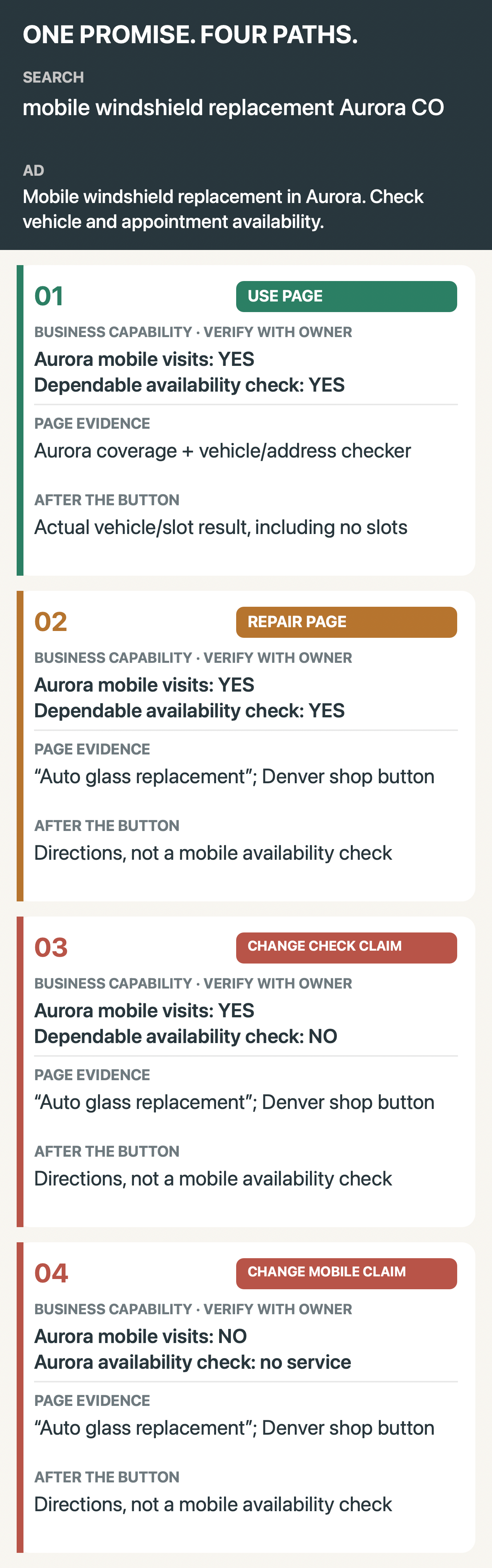
The full comparison in words:
- Use the page: The business offers Aurora mobile visits and can dependably check vehicle eligibility and appointment availability. Its page shows coverage and asks for vehicle and address; the button returns real eligibility and times, or clearly reports no slots or ineligibility. The ad promised a check, not an appointment today. Use this destination if coverage and booking remain current.
- Repair the page: This business also makes Aurora mobile visits and can perform the promised check. But its generic “Auto glass replacement” page sends the main button to Denver shop directions. After the click, the visitor gets directions, not availability. Here page work is warranted: show the real service and its conditions, then route the primary action to the real check. A shop link can remain for shop visitors.
- Change the check claim: This business makes Aurora mobile visits but has no dependable way to check vehicle and appointment availability. Its generic page and Denver-directions button look like path 2, with the same dead end after the click. A better page or lead form would still fail the advertised check. Change the ad's check invitation to a next step the business can actually deliver, or build a dependable check before promising one. The true Aurora mobile-service claim need not disappear.
- Change the mobile claim: This business has only a Denver shop and no Aurora mobile visits. It can show the same generic page and directions button as paths 2 and 3, but there is no Aurora mobile appointment to check. Advertise the shop service to people it can serve, change the real offer, or stop making the mobile Aurora claim. A form for a nonexistent service only collects details before breaking the news.
Make the call on a live destination
Before editing the page, record the service and next action a person could believe from an ad they can actually see, including material location, price, timing or eligibility conditions. Ask the offer owner two separate questions: Can the business make this Aurora mobile visit? Can it dependably determine this vehicle's eligibility and appointment availability for this address? A real check may honestly return no slots. A form that merely collects a lead does not complete this ad's check invitation.
Path 3 is the trap: yes to mobile visits, no to the check. Moving the Denver button cannot create the missing result.
Then open the destination and take the advertised next action with a plausible vehicle and Aurora address. Keep the exact page claim and resulting screen beside the owner's two answers. Missing mobile service calls for a different claim or offer. With service but no dependable check, change the check invitation or build that capability. When both exist but the page or button hides them, repair the page and action. Use the page only if its claim and action keep the promise; recheck when coverage, stock, promotions or booking change.
The distinction has a platform consequence as well as a human one. Google describes landing page experience in terms that include relevance, usefulness, navigation and the expectations created by the clicked ad. Its unavailable-offers policy says an advertised product, service, promotion or call to action that is unavailable or not easily found at the destination is not allowed. That is a reason to verify the path, not a promise that fixing one page will produce a particular Quality Score or conversion rate. See Google's landing-page explanation for the broader experience signal.
If the ad needs explaining after the click, the visitor has been hired as your copy editor. If the service or promised check is missing, no page editor can make it true.